
Service: complaints, visits, quotations and reports
The Service module looks after equipment you have sold, at your customer's site. It appears in the menu as Service when the module is switched on for your account. (For your own machines, use Maintenance.)
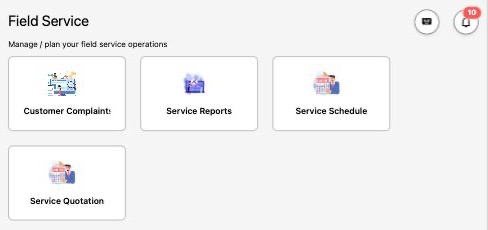
The Field Service page has four cards:
| Card | What it is for |
|---|---|
| Customer Complaints | Register what the customer reported, follow its status and export the list to Excel. |
| Service Schedule | Plan an engineer's visit for a complaint. |
| Service Quotation | Price chargeable work, amend the price or cancel the quotation. |
| Service Reports | Record what the engineer found and did. Saving a report completes the complaint. |
How a service job flows#
Before you start#
✅ Before you start
0/4 readyCreate, edit, amend and cancel#
| Record | Create | Edit | Amend | Cancel |
|---|---|---|---|---|
| Customer complaint | Customer Complaints → Register Complaint | Show More → Edit, by the person who registered it, until it is Completed or cancelled | — | View → Cancel, with a reason, by the person who registered it, until it is Completed |
| Service schedule | Service Schedule → Create Schedule | Show More → Edit, by its creator, until it is cancelled | — | View → Cancel, with a reason, by its creator |
| Service quotation | Service Quotation → Create Quotation, or Create Quote on the complaint (assigned member) | Show More → Edit, by its creator, while it isn't cancelled or amended; preview it again before Update | Amend, by its creator: the new version gets -A1, -A2 and so on, and the original becomes Amended | Cancel, with a reason, by its creator. Cancelling an amendment reopens the quotation it amended |
| Service report | Service Reports → Create Service Report | Show More → Edit, by its creator, until it is cancelled | — | View → Cancel, with a reason, by its creator. The complaint stays Completed |
Every cancel asks for the Reason For Cancellation and is confirmed with Proceed. A cancelled record can't be edited again; create a new one if needed. For every field and step, see Field service.
Statuses#
| Record | Statuses |
|---|---|
| Complaint | Open, Quotation Sent, Inspection Scheduled, In Progress, Completed (also set when a service report is saved), Cancelled |
| Schedule | Scheduled, Rescheduled, In Progress, Completed, Cancelled |
| Service quotation | Open, Amended, Cancelled |
| Service report | Open, Cancelled |
Change a complaint's or schedule's status by clicking its status tag in the register (Update Status). Only the creator or the assigned member can.
Roles and permissions#
In Admin → User Roles, the Service module has four pages, each with Create, Read, Update and Cancel:
- Requests (customer complaints), which also has Export;
- Schedule;
- Service Quotation;
- Reports.
Service schedules and service quotations list only your own entries and those of the service members assigned to you, unless your team settings let you see all members' service entries or Is Admin is on for you.
Rules to know#
- Complaints, schedules, quotations and service reports belong to one Location: the registers show only those of the Location selected in the header.
- The customer box lists only customers of the Company you are working in, and never cancelled ones.
- Service quotations carry no GST: the Grand Total equals the Sub Total.
- Service screens don't move stock or post to the accounts.