
Sales
Sales takes a customer from the first inquiry, through costing and a quotation, to a confirmed customer order. The order then drives delivery, invoicing and, for made-to-order items, production.
The sales flow#
- InquirySales
- CostingCosting team
- QuotationQuotation creator
- Customer orderSales
- Delivery challan, invoice or work orderLogistics, accounts, production
- 1Inquiries start the flow
- 2Customer Orders
- 3Customers: the Customer Master
| Step | Where | What it does |
|---|---|---|
| Inquiry | Sales → Inquiries → Create | Records what the customer asked for, who handles it (Sales Member) and who will quote (Quotation Creator) |
| Costing (if your company uses it) | From the inquiry: Request Costing | Your costing team works out the cost before you quote |
| Quotation | From the inquiry (Create Quote in the Inquiries list's actions) or from a submitted costing (Convert To Quote) | The offer to the customer. From the inquiry, only its Quotation Creator can create it; there is no stand-alone Create button |
| Customer order | Sales → Customer Orders → Create, or Convert To Order on the quotation | The confirmed order, with Reference set to Quotation or None |
| Next documents | The order's menu | Create Delivery Challan, Create Sales Invoice, Create / Amend Work Order |
Some documents live in other menus: Sales Invoices are created under Finance → Sales Invoices (the Sales card only lists them), Credit Notes and Payments Received are under Finance, and Delivery Challans are under Logistics.
Before you start#
✅ Before you start
0/5 readyApprovals#
Inquiries, quotations and customer orders have no approval step. Two things do need specific people:
- Special Price requests are approved or denied by the Special Price Approvers set for each Company in App Settings → Sales → Special Price (the Approve fields show only when their role also has Special Price update).
- Blocked customers can be unblocked by the customer's creator or the users chosen in Choose Who Can Unblock Customers (App Settings → Sales → Customer Master). While a customer is hard- or manually blocked, the customer order form keeps Create greyed out for them; a soft block only shows a warning. See Customer orders.
Export the Daily Sales Report#
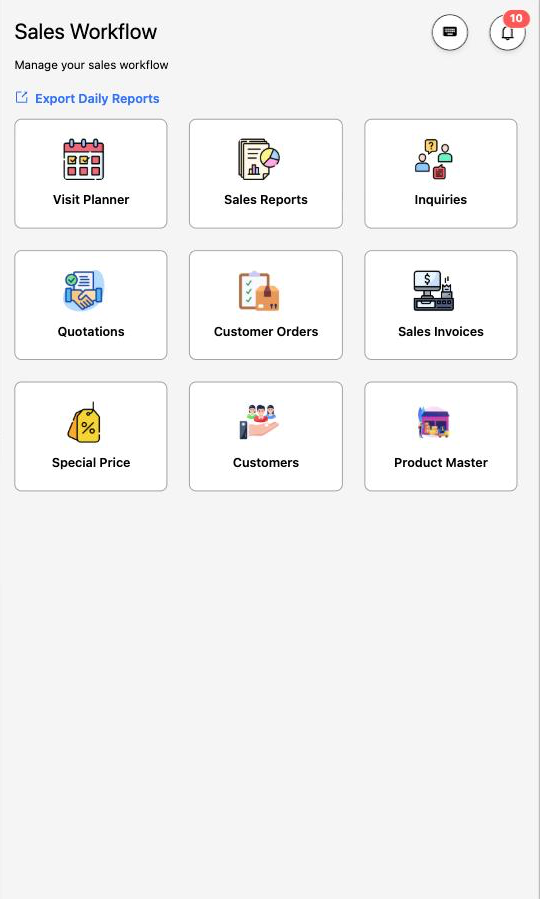
The Sales Workflow page has an Export Daily Reports button above the cards.
Open the export
📍 Sales → Export Daily ReportsThe dialog asks you to Select a date to export daily reports. Pick the Date (today or earlier) and, optionally, the Member Names whose entries you want.
Download it
📍 Export Daily Reports → ExportYou get an Excel file, Daily Sales Report, for the Location you are working in. With the standard layout it has separate sheets (Inquiry, Quotation, Customer Orders, Follow Ups) for the inquiries, quotations and customer orders created that day and the quotation follow-ups added that day. Some companies have a different, single-sheet layout.
You need the Export permission on Sales → Sales Reports.
Sales invoices on the Sales menu#
The Sales Invoices card lists the sales invoices of the Company and Location you are working in so the sales team can follow billing without opening Finance. It shows Date, Invoice No, Customer, Customer P.O., Grand Total, Pending Amount and Sales Member, and filters by Invoice Date and Sales Member. View opens View Sales Invoice with the customer details, other details and requirements.
The list is read-only: create, change, cancel and export invoices under Finance → Sales Invoices (see Customer invoice to receipt). The card needs Sales → Sales Invoices read; the invoices then load without Finance → Sales Invoices, which is needed only to work with them under Finance.
Taxes on sales documents#
| Document | How tax is set |
|---|---|
| Quotation | No tax: the Grand Total equals the Sub Total |
| Customer order | From the Tax Rule chosen on the order. Without a rule, no tax is calculated |
| Sales invoice | From the Sales Invoice tax rule. Without a rule, the invoice can't be saved |
Rules to know#
- A customer order takes its tax from the Tax Rule chosen on it; without a rule, no tax is calculated.
- Inquiries, quotations and customer orders belong to the Company and Location you are working in: their lists and the Daily Sales Report cover only that Location.
Related workflows#
Customer order to invoice
Order, work order, production, dispatch and invoice.
Customer invoice to receipt
Sales invoice, e-invoice, receipt and reports.
Leads, visits and tasks
Leads, sales visits, tasks and dashboards.
Inquiry to customer order
Costing, quotation, special price, order.
Quotations
The quotation form, preview, edit, amend and close.
Customer orders
Create, change, amend, cancel and close orders.
Product Master
Products, BOM strategy and revisions.