
Material for production: requirement, requisition, issue and consumption
Example. Work order 0042 needs 120 kg of steel sheet and 400 bolts. Starting processing shows that stock covers the sheet but not the bolts, so a purchase request is raised for the bolts. The supervisor then requests the sheet from stores, the store keeper issues it against the work order, and unused sheet goes back to stores on a material return.
Who does what#
| Step | Typical person | Screen |
|---|---|---|
| 1. See the requirement | Production planning | Work order → BOM → Start Processing |
| 2. Request material | Supervisor or department in-charge | Work order → More → Materials Requests & Returns, or Inventory → Material Requisitions |
| 3. Issue material | Store keeper | Material requisition → Convert to Material Issue Note |
| 4. Return unused material | Supervisor or store keeper | Inventory → Material Issued → issue note → Create Material Return Note |
Before you start#
✅ Before you start
0/5 readyStep by step#
See what the work order needs
📍 Work order → BOM → Start ProcessingFor a Standard (Fixed BOM) or Template BOM, the Material Resource Planning table shows, for each material: BOM Qty, Required Qty (scaled to the work order quantity), Physical Stock, Reserved Stock, Free Available and Shortage. Custom BOMs show the materials in the processing wizard, which also has a Create Material PR step.
The requirement is shown on screen; it isn't saved as a separate document. When you start processing, the materials are added to the work order, the free stock is reserved for it, and a purchase request is raised for the shortage. Follow that request in the purchase request to stock journey. The requirement table is explained in Material requirement and shortage.
Request the material
📍 Work order → More → Materials Requests & Returns → Create Material RequisitionYou can also use Inventory → Material Requisitions → Request Material and choose Work Order as the reference. Fill in:
- Date, Department and Assign To (the person in that department who handles it);
- Requisition Purpose: Production, Service, Spares, Repair, Assembly, Rework or Others;
- depending on the purpose, the reference (None, Work Order or Purchase Request) with the Work Order and Product, customer details for Service, Spares and Repair, or a Reason for Others;
- the items, with Request Qty against what is Required, already Issued and what you Can Request.
A new requisition is Pending. There is no approval step: it goes to the person you assign.
Goods bought for a purchase request, for example the shortage of this work order, can also be requested straight from their GRN once they are in stock: see Request material from a GRN.
Open the full-size screenshot of Inventory: Create Material Requisition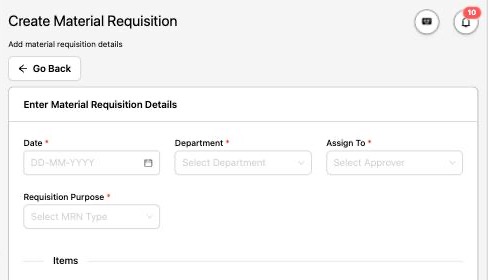
Issue the material
📍 Material requisition → Convert to Material Issue Note → Create Material Issue NoteThe store keeper confirms the quantities and stores to issue from. Saving the issue note:
- takes the stock out of the store as consumption by the work order, using any stock reserved for it;
- records the issued quantity on the work order's raw materials;
- records the value of the issued material against the work order; when the product is later received into finished goods, that value (less what was returned) sets the value of the finished goods;
- locks the product's bill of materials for the work order if it isn't locked yet (it is normally locked already when processing starts; otherwise on the first material issue or finished-goods receipt). A product on a shared standard bill of materials gets its own frozen copy;
- sets the requisition to Partially Issued or Issued.
Issuing or returning material posts no accounting entry in the current version. A product can't be received into finished goods while any of its job cards is still open: complete or cancel them first. The store keeper can issue only from stores in their Accessible Stores.
Issue notes are listed under Inventory → Material Issued. They're always created from a requisition.
Return what wasn't used
📍 Issue note → Create Material Return NoteCreate a full return for unused material, or an offcut return for usable remnants. Approving a full return brings the stock back into the store it was issued from. Only the chosen approver can approve, and the approver also needs that store in their Accessible Stores. Returns are listed under Inventory → Material Returned. For the known limits of cancelling a full return and approving off-cuts in this version, see Material returns and off-cuts.
For every field, status and refusal, see Material requisitions and issue notes and Material returns and off-cuts.
Statuses#
| Document | Statuses |
|---|---|
| Material requisition | Pending → Partially Issued → Issued (or Cancelled) |
| Material issue note | Issued → Partially Returned → Fully Returned, as returns are approved |
Common mistakes#
Edit a requisition or a return note#
- Material requisition: Show More → Edit in the list. The list greys it out for anyone but the creator, and once material is issued. You can change the date (not in the future), department, Assign To, purpose, reference, reason and quantities; lines left at 0 are dropped.
- Material return note: Show More → Edit in Inventory → Material Returned. The list greys it out for anyone but the creator, and once the note is approved or cancelled. You can change the date, department, Return To and the return quantities and remarks (or the off-cut pieces). Stock moves only when the note is approved.
Rules to know#
- The person you assign a material requisition to must be an active member of your team with access to your Location (Approver does not have access to this location.).
- Once material has been issued against a requisition, the requisition can no longer be edited or cancelled.
- An issue note needs at least one line with a quantity above zero, and can't be created once everything requested has already been issued.
- An issue line can't be for more than its requisition line still needs: the issue quantity is capped at the Max shown under the box. If the requisition changed meanwhile, saving shows Cannot issue more than requested (…) for … and nothing is issued.
- Issue notes can't be edited. Give back unused material with a return.
- A material return must be for an item that was issued, with a quantity above zero and no more than was issued and not already returned.
- A material return note can be edited only until it is approved or cancelled.
- A return can't be approved if its issue note was cancelled or if it would return more than was issued.
- An approved material return note can't be cancelled.